Changelog

What’s new in Skavelo

New features, improvements and fixes, newest first, with where to find each one and which plans include it. Follow along with the RSS feed.

  1. NewWalkthroughs

    Walkthrough offers

    Most of the time Skavelo helps when a user asks. Some moments are worth helping with before anyone does: a new user opening Broadcasts before adding a sending domain, or someone who has just created their first project.

    A walkthrough offer shows a short card above the widget at that moment, such as “Before your first broadcast, add your sending domain. I can show you how.” Clicking it opens an introduction with the walkthrough’s name, what it does and how many steps it has, then Start or Not now. Nothing starts on its own.

    • Show an offer on the pages you choose, or after something your app reports with skavelo.event("project_created"). The same page, people and site rules as suggestions decide who sees it.
    • Each person sees an offer once, and Not now means they aren’t asked again. One offer shows per visit at most, never while someone is typing.
    • Offers don’t count as conversations. Each one shows how often it was shown, accepted and completed, and the Monday summary includes them.
    • Offered walkthroughs keep working when Skavelo re-learns your app.
    Where to find it
    Agent, then Product map, under Walkthrough offers
    Plans
    Free: 1 offer. Starter: up to 3. Growth and Enterprise: unlimited.
    How walkthrough offers work

    NewWalkthroughs

    Steps show next to the button

    Walkthrough steps appeared in the widget at the bottom of the screen, away from the highlighted button, so users looked back and forth between the two.

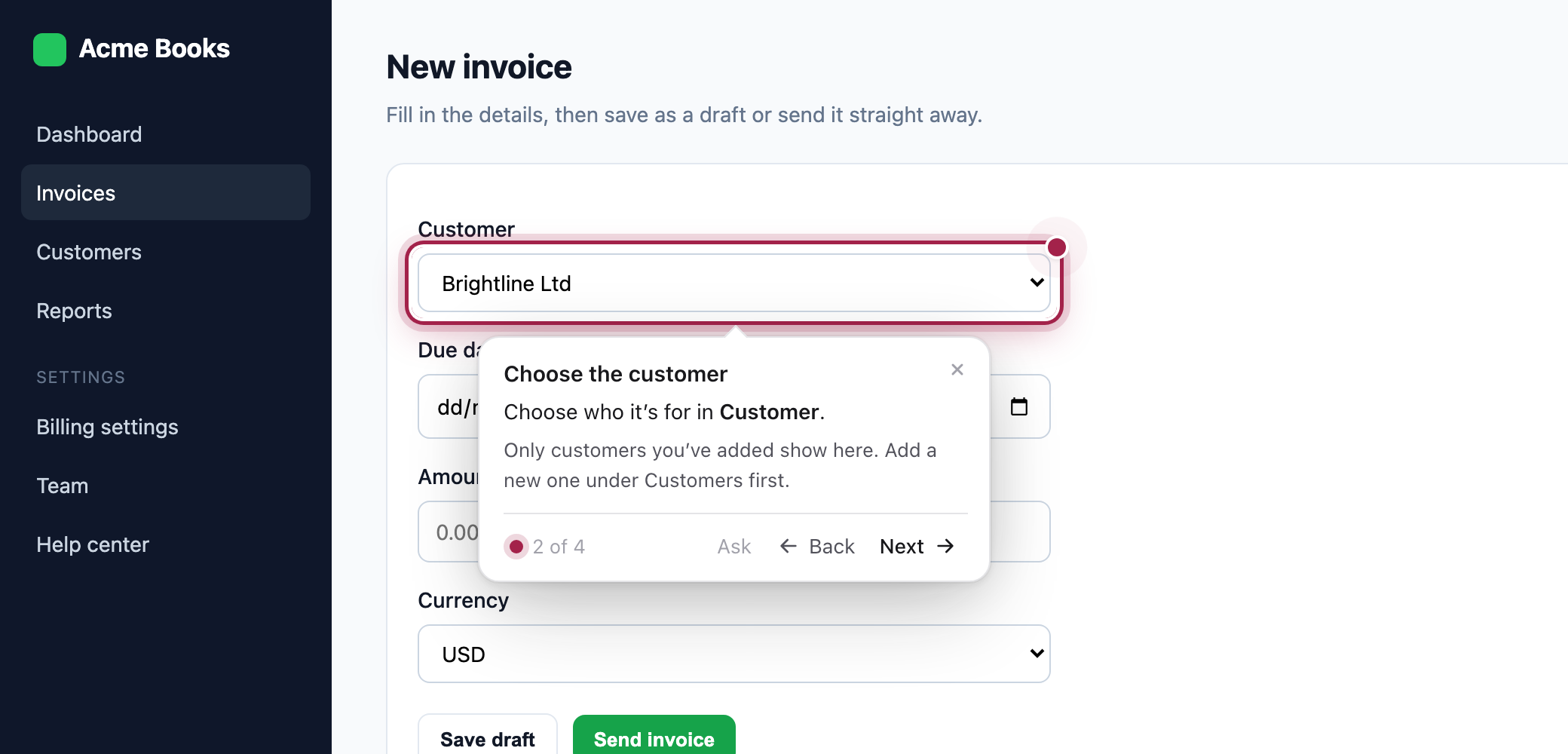
    Each step now shows on a small card beside the control it points at, with Back and Next, and the widget folds down to its launcher. Ask on the card opens the widget on the same step, for a question partway through.

    A walkthrough step card beside the highlighted Customer field, titled Choose the customer, with details, 2 of 4, Ask, Back and Next
    • The card goes below the control, or above or beside it when there’s more room there, and follows it as the page scrolls.
    • On phones, steps stay in the widget, where they’re easier to read.
    • Sites using the install snippet get it automatically. With the npm package, update to 0.1.4.
    Where to find it
    In the widget, during any walkthrough
    Plans
    All plans

    ImprovedWalkthroughs

    Step titles and details

    An instruction like “Click Continue” says what to do, but not why, or what to have ready.

    Each step can now have a short title and a sentence or two of details, shown on the step card. Learning drafts them where they help, and you can write or edit them yourself. A walkthrough’s description now introduces it when it starts without a question, as with offers.

    Where to find it
    Agent, then Product map: edit a walkthrough and choose Add a title and details under a step
    Plans
    All plans

    ImprovedWalkthroughs

    Help when a step’s button isn’t on screen

    When a step’s button was inside a window the user hadn’t opened, or the user skipped a step with Next, the widget said the item wasn’t visible and left them to work out why.

    Now it points at the way in. If an earlier step’s button is on screen, such as Add customer for a field in the window it opens, the card says “First, click Add customer” there, then moves to the field once it appears. With nothing to point at, it says what it can’t find and offers to go back a step or ask about it.

    Plans
    All plans

    Improvements

    • WidgetDevelopers can start a saved walkthrough from code with skavelo.startWorkflow(id), with an optional introduction, and it doesn’t use a conversation. New walkthrough_start and offer events report how walkthroughs start and what users do with offers.
    • DashboardSign out now ends that session on Skavelo’s side as well as in your browser, so a copied session stops working straight away.
    • DashboardLong lists, like the walkthroughs to offer, now let you type to find what you need.
  2. NewWidget

    Install from npm, with React components

    The widget could only be added with a script tag. In apps built with React, Next.js or Vue, that tag sits outside the code your team reviews and ships, and passing in the signed-in user meant reaching for a global.

    Skavelo is now on npm as @skavelo/sdk. Install it with your other dependencies and start it in code. For React and Next.js, SkaveloProvider starts the widget safely with server rendering, and hooks like useSkavelo and useSkaveloEvent let your components open it or react to what users do in it.

    • The install guide has steps for React, Next.js, Vue, Nuxt, Svelte, Angular and Google Tag Manager, as well as the script tag.
    • With the script tag, browsers now keep the widget between visits, and each new version still reaches your site automatically.
    Where to find it
    Agent, then Install
    Plans
    All plans
    Install the widget
  3. NewAnswers

    Skavelo works out why something isn’t working

    When a user said “why won’t this save?”, Skavelo answered like any other question, from what it learned, and often couldn’t say more than where the setting lives.

    Now it looks for the cause first, the way your support team would: the error on the user’s screen, the request that just failed and what its status means, switched off buttons and their reasons, and the user’s own data through your lookups. It explains the likely cause in plain words, then the fix. When it can’t find one, it says what it checked and offers a person straight away.

    • Failed requests are kept for 2 minutes, in the browser: method, path and status only, with IDs removed. Switch it off with diagnostics: { network: false }.
    • Handoffs carry what Skavelo checked and the likely cause, in the email, the message in your support chat and the handoff event.
    • Needs attention and Conversations label reported problems and show the diagnosis, and the Monday summary lists the problems reported most.
    Where to find it
    Agent, then Needs attention, under Reported a problem
    Plans
    All plans
    How answers work

    NewAnswers

    Playbooks

    Your team knows how to troubleshoot your product’s common problems: which setting to check first, what an error really means, when to escalate. Skavelo couldn’t know any of that.

    A playbook writes it down in plain language: when to use it, what to check in order (something on screen, a lookup of the user’s data, or a question to ask), what each finding means and what to do, and when to hand off. Skavelo follows it when a user reports that problem, in its own words.

    • New playbooks start off. Set one to Testing and it’s used only in Try it, so you can check it before users see it.
    • When three or more users report the same problem, Skavelo drafts a playbook from those conversations, with links to each one. Nothing is used until you accept it.
    • Each playbook shows how often it was used, settled the problem or was handed off.
    Where to find it
    Agent, then Playbooks
    Plans
    Free: your first one. Starter: up to 3. Growth and Enterprise: unlimited.
    Compare plans

    NewLearning

    Suggestions for your developers

    Some markup makes controls hard to name: an icon button with no label, a label that isn’t tied to its field, a clickable box that isn’t a button. Skavelo copes with most of it, but walkthroughs are more reliable without it.

    Each learning run now lists what it found, grouped by kind, with the screens and examples, why it matters and the code change that fixes it. The same fixes make your app easier to use with a screen reader.

    Where to find it
    Agent, then Learning, under Suggestions for your developers
    Plans
    All plans

    ImprovedPlans

    Lookups and actions on Free and Starter

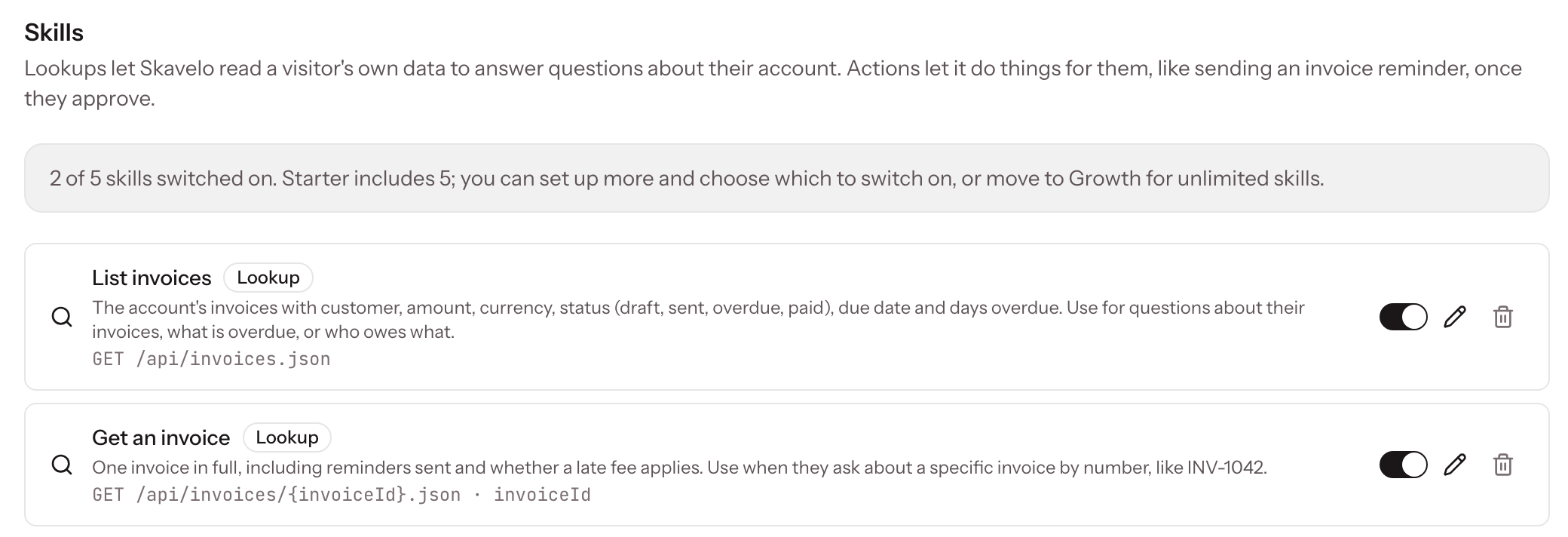
    Lookups let Skavelo answer questions about a user’s own account, like which invoices are overdue, and actions carry out tasks once the user approves them. Until now both needed Growth, so a small product that needed one or two had to pay for 10,000 conversations to get them.

    Your first lookup or action is now free on every plan, Free included, and Starter includes up to 5 switched on. Growth and Enterprise stay unlimited.

    The Skills page on Starter, showing 2 of 5 skills switched on and two lookups
    • Only switched on skills count, so you can set up more and choose which 5 to use.
    • At the limit, switching another one on tells you to switch one off or move to Growth.
    • If you move from Growth to Starter with more than 5 switched on, the 5 oldest keep working.
    Where to find it
    Agent, then Skills
    Plans
    Free: your first one. Starter: up to 5. Growth and Enterprise: unlimited.
    Compare plans

    Improvements

    • AnswersWhen Skavelo learned your app on staging, links in its answers now point to the same page on the site your user is on, so nobody is sent to your staging address.
    • DashboardNew agent tells you before you start when your plan doesn’t include another agent, instead of after you fill in the form.
    • PlansAfter a move to a smaller plan, agents beyond its limit stop answering and say so on their pages, while the oldest ones keep working.
    • LearningRe-learning from your deploy pipeline now needs Starter or above, as the plans page describes. On Free, use Learn now once a month.

    Fixes

    • WidgetClosing the widget during a walkthrough now ends the walkthrough. Before, it kept running unseen and reopened the widget when the user clicked into a field.
    • WidgetClicking the widget, or pressing Escape in it, no longer closes a modal or menu that’s open on your page.
    • WalkthroughsA walkthrough that starts on another page, such as one in Settings, now first points at the link that gets there, like the Settings icon, instead of saying the step isn’t on this page.
    • WalkthroughsWalkthroughs now highlight form fields whose label isn’t formally tied to them, such as a Street address label above its input, instead of saying the field isn’t on the page.
  4. NewWalkthroughs

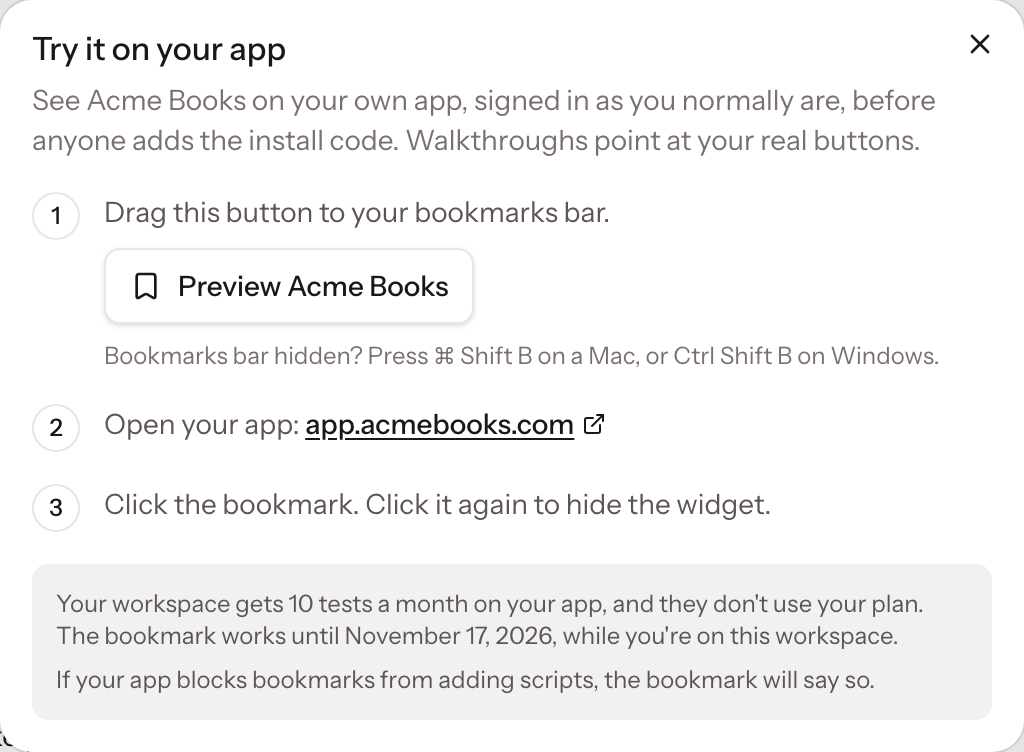
    Try it on your app

    Trying Skavelo in the dashboard shows its answers, but walkthroughs point at buttons in your own app, so you couldn’t see them working until someone installed the widget.

    Now a bookmark puts the widget on your own app, signed in as you normally are, before anyone adds the install code. Walkthroughs highlight your real buttons, and clicking the bookmark again hides the widget.

    The Try it on your app dialog, with the bookmark to drag to the bookmarks bar and three steps
    • Each workspace gets 10 tests a month on your app and 10 in the dashboard. Neither uses your plan’s conversations.
    • A bookmark works for 30 days, and stops if you leave the workspace.
    • If your app blocks scripts added by bookmarks, the bookmark says so; use a staging copy with the install code instead.
    Where to find it
    Agent, then Try it, then On your app
    Plans
    All plans, on desktop browsers
    How walkthroughs work

    ImprovedWidget

    Conversations carry on across tabs

    A user who opened your app in a second tab used to start a new conversation, losing their earlier questions and counting again against your plan.

    Now the conversation carries on in every tab, and when they come back within 30 minutes.

    • A conversation belongs to whoever was signed in, so the next person on a shared computer starts fresh.
    • A walkthrough in progress stays in the tab it started in.
    Plans
    All plans

    Improvements

    • WidgetA softer, deeper shadow so the widget stands out on any page, and on its suggestions too.
    • WidgetThe input bar and launcher are a little taller, and the placeholder text is easier to read.
    • DashboardTry it is now one button with a choice: Here in Skavelo, or On your app.

    Fixes

    • WidgetThe Skavelo logo in the input bar sat a few pixels higher than the text beside it.
  5. NewDashboard

    Needs attention

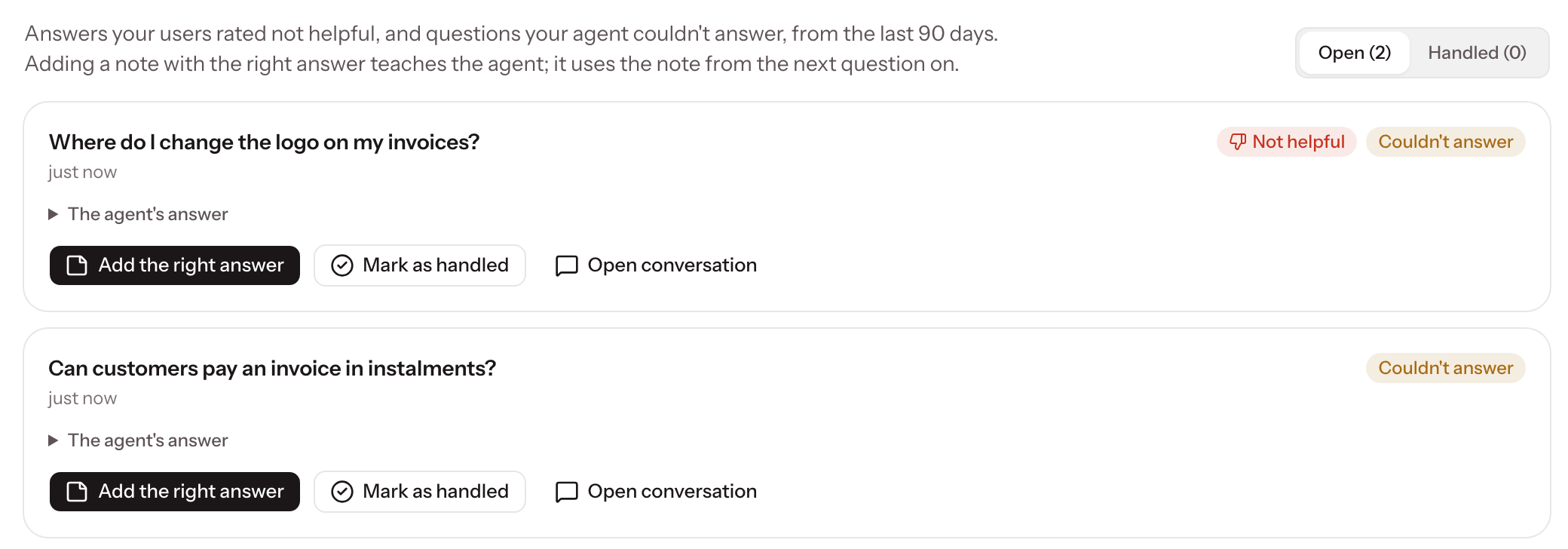
    Questions Skavelo couldn’t answer and answers users rated unhelpful were spread across the conversation log.

    Needs attention collects them in one list per agent, with the question that was asked. Add the right answer as a note and Skavelo uses it from then on, then mark it handled.

    Needs attention listing two questions the agent couldn’t answer, one also rated not helpful, each with Add the right answer
    Where to find it
    Agent, then Needs attention
    Plans
    All plans
    How insights work

    NewDashboard

    Try it on every agent page

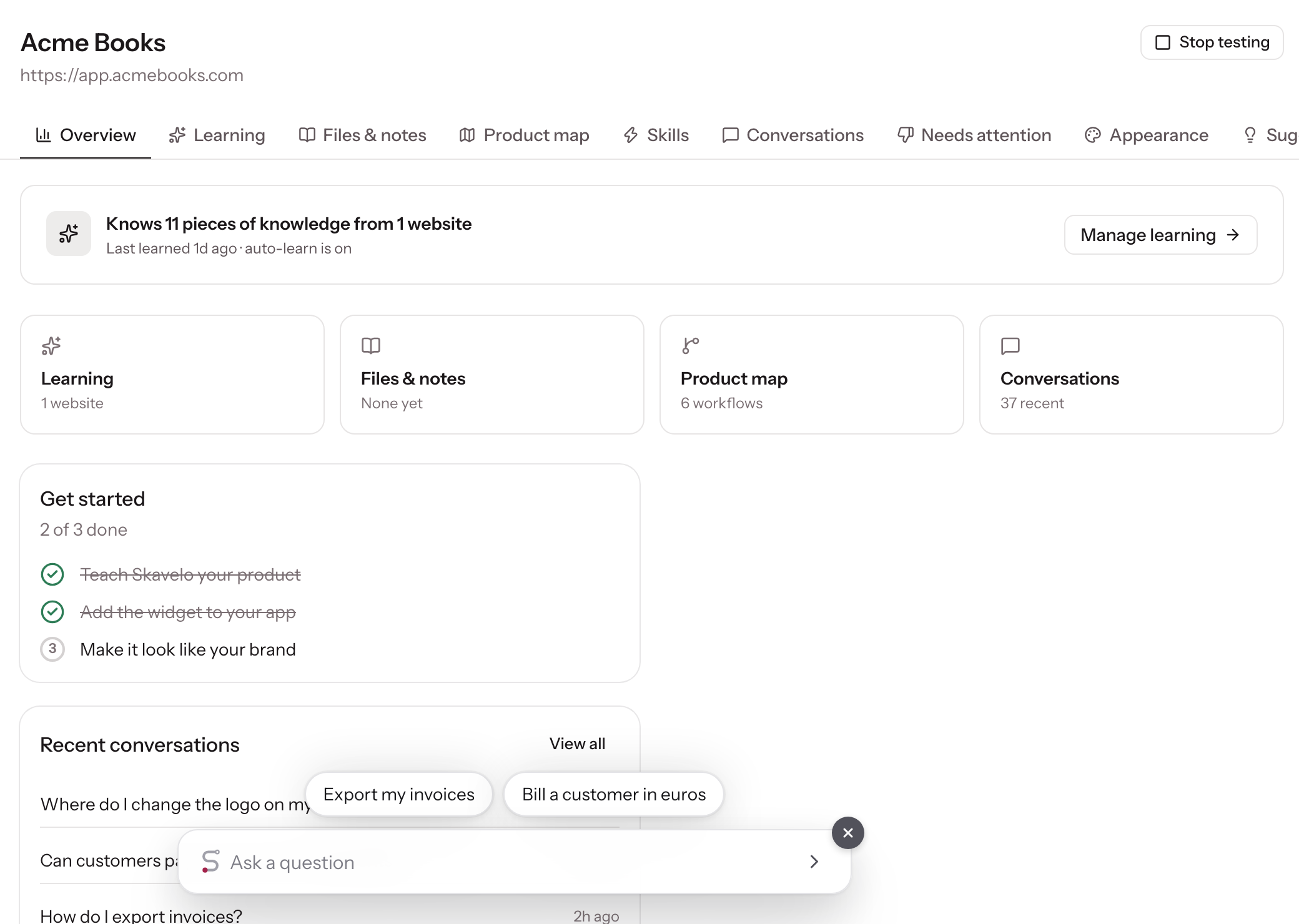
    Testing an agent used to mean going back to setup. Now a Try it button on every agent page opens its widget right there, so you can check answers after changing notes, files or learning.

    An agent page with the widget open after Try it, showing its suggestions and the Stop testing button
    Where to find it
    Any agent page, next to the agent’s name
    Plans
    All plans

    Improvements

    • AnswersMost answers start appearing sooner: simple questions use a faster model, and developer or several-part questions keep the most capable one.
    • AnswersHow-to questions find the right page more often, because Skavelo now notes the questions people are likely to ask on each screen.
    • LearningLearning moves through busy apps more quickly, and waits for menus that load late so it captures what’s behind them.
    • WidgetWhen a test reaches its monthly limit, the message says when it renews.

    Fixes

    • WalkthroughsSkavelo no longer builds a walkthrough for something your product can’t do. It says so instead.

Try the latest on your own product, before you add any code.

Start free